Showing posts with label Print and Cut. Show all posts

Thursday, October 10, 2019

Lori Whitlock | Gift Bag

Have you seen the new sticker sets in the Lori Whitlock SVG Shop?  There are 2 new Birthday Sets (Birthday Stickers (SVG, Silhouette), Birthday Stickers 2 (SVG, Silhouette)) and a new set of Fall Stickers (SVG, Silhouette).  These stickers can be used for a number of different projects... in addition to planners, you can use them on cards, gift bags, etc.  Individual stickers can be resized... larger for a gift bag for instance or you can print a few of the same stickers to make cards in multiples.  I used the new fall stickers to decorate a little gift bag.  Take a peek...


I used Echo Park Paper's My Favorite Fall to make the bag, along with Lori's Gift Bag with Scallop Handle (SVG, Silhouette).  Head over to Lori's Blog to see a tutorial showing how to print and cut stickers for various projects.
Have a great day!

Tuesday, September 10, 2019

Lori Whitlock | September Creative Team Blog Hop


Hi Everyone!   It's time for the September Creative Team Blog Hop over at Lori Whitlock!  You should have arrived here from Traci's Blog.  Here's the order for today's hop!

Lori Whitlock
Traci Penrod
Anita Mulcahey
Kathy Skou {You are here}
Brandie Adams
Michelle Zerull

Aimee Kidd
Ashley Cook

I made Lori's Extreme Pop-Up Card Fall (SVG, Silhouette).  I just adore the little hedgehog!!! I used some of the My Favorite Fall Collection from Echo Park for the front of the card.


There's a sale happening in the Lori Whitlock SVG Shop!  Use code SEP2019 to get 25% off all SVGs and Commercial Licenses!


Also, how about a free file!!  This file is free for today only!  No code or minimum required.


Finally, how would you like to win a $20 Coupon to Lori's SVG Shop!

a Rafflecopter giveaway


Your next hop stop is Anita!  That's it for me today, thanks for stopping by to peek!

Tuesday, July 10, 2018

Lori Whitlock: July Creative Team Blog Hop


 Hi Everyone!   It's time for the July Creative Team Blog Hop over at Lori Whitlock!  You should have arrived here from Traci's Blog.  Here's the order for today's hop!

Lori's Bobble Head Cards just make me smile!  I love how they can really be customized for any occasion!  This month I used Lori's Bobble Head Cow Card.(SVG, Silhouette).  I added a speech bubble from the 3 Thought Bubble Set ( Silhouette) and wrote a fun greeting using the LW Bubble Letter Font ( SVG, Silhouette).


The papers and flower sprinkles are from Doodlebug Design.

There's a sale happening in the Lori Whitlock SVG Shop!  Use code JUL2018 to get 30% off all SVGs and Commercial Licenses!


Also, how about a free file!!  This file is free for today only!  No code or minimum required.


Finally, how would you like to win a $20 Coupon to Lori's SVG Shop!


a Rafflecopter giveaway

That's it for me today, your next stop on the hop is Brandie!  Have a great day!


Thursday, February 15, 2018

Lori Whitlock: Using Pattern Fills in Silhouette

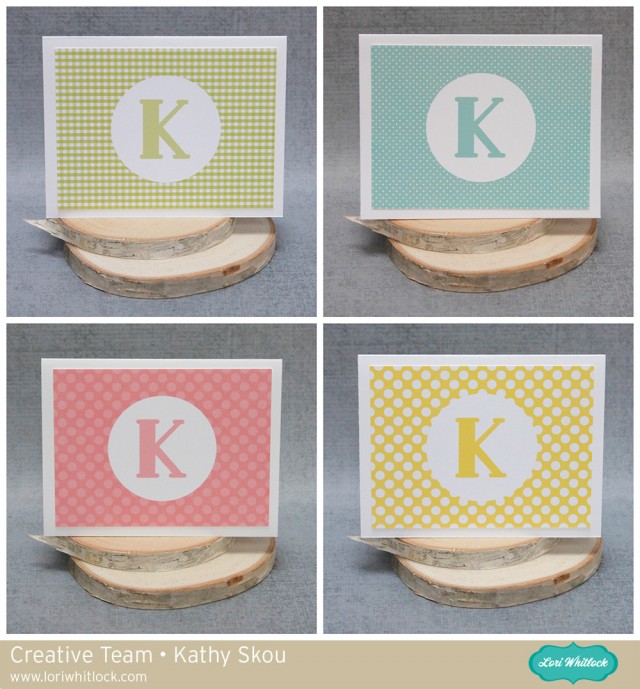
Hi Everyone!  Today I have some fun monogrammed note cards I created using Lori Whitlock's Pattern Fills and my Silhouette.  When I was younger, I always had note cards lying around in case I needed to write a thank you or thinking of you card.  These days with email and texting, it seems like a lost art, but I still think it's important to send a hand written note for some situations!  I created these to have on hand, in case nothing but a hand written note would do!

Before I show how I created the cards, I thought it would be helpful to show how to add these patterns to your Silhouette Library.  Once you've purchased the files from Lori's Shop (they are not available through the Silhouette Store) you want to unzip the file.  Next you will want to open your Silhouette Library, and also open another window showing the Fill files on your computer.  To add them in bulk to your library, select all of the files at once, click and drag them over to the Patterns category of your library as shown below...
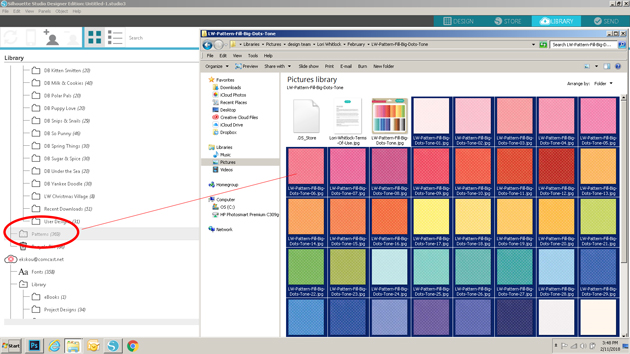

This will add all of the files to your Silhouette library at once, and they will be available for use through the Patterns category of the Fill function.  Now for the cards themselves.  I actually didn't create the whole card in Silhouette, just the front layer.  By creating just this layer, it enabled me to get more per piece of paper since I wasn't cutting the entire card.  I started by opening my Silhouette software and creating a 3.75" x 5" rectangle.  This is the size of my front layer and allows for a .25" border all around. (my note cards are standard A2 sized or 5.5" x 4.25")


Next, I added the fill to this rectangle.  To do this I clicked on the fill button (the paint palate icon), then selected fill pattern (the dotted button).  This brings up all of the fills I've loaded to my Silhouette Library.  I scrolled down until I found the pattern.  I clicked on my shape to select it, then clicked on the pattern fill I wanted.


The next step was to create the Monogram Circle.  I started by drawing a circle using the shape tool.  I sized it to be 2.5".   I filled that circle with white using the Fill function, selecting the circle and clicking on the white square.


For the letter I chose Lori's Deco Font (Lori's Shop, Silhouette) and sized my letter to 100.


I wanted my letter to be the same color as my background.  To do this, I first selected my letter by clicking on it, and opened the Fill Window.  I clicked on the dropper icon, then moved over to a blue area on my background piece and clicked.  This added the background color to my letter.


The last steps of design were simply to center everything for printing.  I first centered the letter in my circle using the Transform Panel.


Using the same buttons, I then centered the circle on my background.


Once everything was centered, I selected all portions of the design, right mouse clicked and selected group.  This is a very important step.  It allows you to cut just the outside of the design when using the Silhouette  print and cut function.


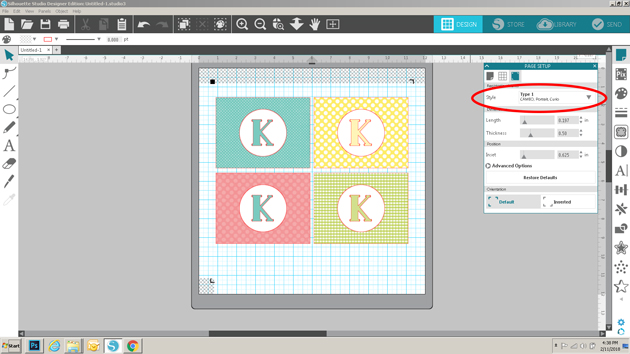
I created a few different cards using the same method and some different fills.  I then set up the printer registration marks by selecting Page Set Up, Registration marks and Type 1 Cameo.  I have a wide format printer, so I can print 12" x 12".  If you're using a standard printer, you would set up the paper size to be 8.5" x 11" (from the page set up menu) and you would need to print 2 per page rather than 4.


I then sent the file to print.


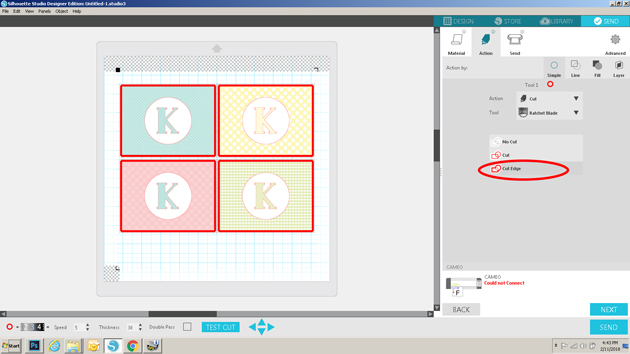
Once printed, I clicked on send, selected my media, then most importantly selected cut edge under action.  Since I grouped each of the cards to be one file, this will insure that only the edges of the card fronts are cut.  I then sent it to cut.


To finish my cards, I glued the front layers to a standard A2 Card ( paper cut to 5.5" x 8.5" then folded in half for card).


These would make a fun gift for a friend or family member!  I've also used the same process to make thank you notes for my daughter to send to companies she has interviewed with for her summer internship!  The possibilities are endless.   That's it for me today, thanks for stopping by to peek!

Thursday, December 28, 2017

Doodlebug Design: Cut Files Print and Cut Calendar

Hi Everyone!  I'm was up on the Doodlebug Blog yesterday with a cute little desk calendar I created using a number of Doodlebug Cut files available in both the Lori Whitlock SVG Shop and in the Silhouette Design Store.  Take a peek...


I wanted to create a few gifts for friends this holiday season, but needed to keep the project manageable, lol.  I decided to make some cute little print and cut calendar pages using Doodlebug Cut files and this calendar file from Lori Whitlock (found here in the Silhouette Store).   I simply backed them with some Gingham Linen Petite Prints and added them to a frame!  Here are some close-ups of the individual months and links to the files used.  I was able to make the pages both horizontal and vertical because the frame can be set either way...


Here Comes Santa - Snowman  (Lori Whitlock SVG Shop, Silhouette)
Here Comes Santa - Birds  (Lori Whitlock SVG Shop, Silhouette)
Here Comes Santa - Snowflakes 1  (Lori Whitlock SVG Shop, Silhouette)
Milk & Cookies- Snowflakes  (Lori Whitlock SVG Shop, Silhouette)


Cream & Sugar - Candy  (Lori Whitlock SVG Shop)
Cream & Sugar - Borders  (Lori Whitlock SVG Shop, Silhouette)


Fairy Tales - Rainbow with Clouds  (Lori Whitlock SVG Shop, Silhouette)


Spring Things - Umbrella  (Lori Whitlock SVG Shop, Silhouette)
Spring Things - Rain Cloud  (Lori Whitlock SVG Shop, Silhouette)
Easter Express - Mr. Chick  (Lori Whitlock SVG Shop, Silhouette)


Spring Things - Bee  (Lori Whitlock SVG Shop, Silhouette)
Spring Things - Flower Cluster  (Lori Whitlock SVG Shop, Silhouette)


Spring Things - Bird in a Tree (Lori Whitlock SVG Shop, Silhouette)
Spring Things - Rain Clouds (Lori Whitlock SVG Shop, Silhouette)
Fun in the Sun - Sun  (Lori Whitlock SVG Shop, Silhouette)


Yankee Doodle - Wagon  (Lori Whitlock SVG Shop, Silhouette)
Yankee Doodle - Flower Cluster  (Lori Whitlock SVG Shop, Silhouette)
Yankee Doodle - Flower  (Lori Whitlock SVG Shop, Silhouette)


Under the Sea - Seaweed  (Lori Whitlock SVG Shop, Silhouette)
Under the Sea - Shells  (Lori Whitlock SVG Shop, Silhouette)
Anchor's Aweigh - Fish  (Lori Whitlock SVG Shop, Silhouette)


Back to School - Pencil  (Lori Whitlock SVG Shop, Silhouette)
Back to School - Push Pins  (Lori Whitlock SVG Shop, Silhouette)
Back to School - Apple and Worm  (Lori Whitlock SVG Shop, Silhouette)


Booville - Candy  (Lori Whitlock SVG Shop, Silhouette)
Booville - Ghosts  (Lori Whitlock SVG Shop, Silhouette)
Booville - Fat Pumpkin  (Lori Whitlock SVG Shop, Silhouette)
Booville - Halloween Kitty  (Lori Whitlock SVG Shop, Silhouette)
  Boos & Brews - Bat with Moon and Stars  (Lori Whitlock SVG Shop, Silhouette)


Flea Market - Mice  (Lori Whitlock SVG Shop, Silhouette)
Flea Market - Sun Flowers  (Lori Whitlock SVG Shop, Silhouette)
Flea Market - Pumpkins and Acorn (Lori Whitlock SVG Shop, Silhouette)


Milk & Cookies - Santa  (Lori Whitlock SVG Shop, Silhouette)
Milk & Cookies - Mrs. Claus   (Lori Whitlock SVG Shop, Silhouette)
Milk & Cookies - Kitty   (Lori Whitlock SVG Shop, Silhouette)
Milk & Cookies - Puppy   (Lori Whitlock SVG Shop, Silhouette)
Milk & Cookies - Gumdrops   (Lori Whitlock SVG Shop, Silhouette)

My friends really liked them!  That's it for me today, thanks for stopping by to peek!


Monday, June 26, 2017

Lori Whitlock: Get Well Soon Card

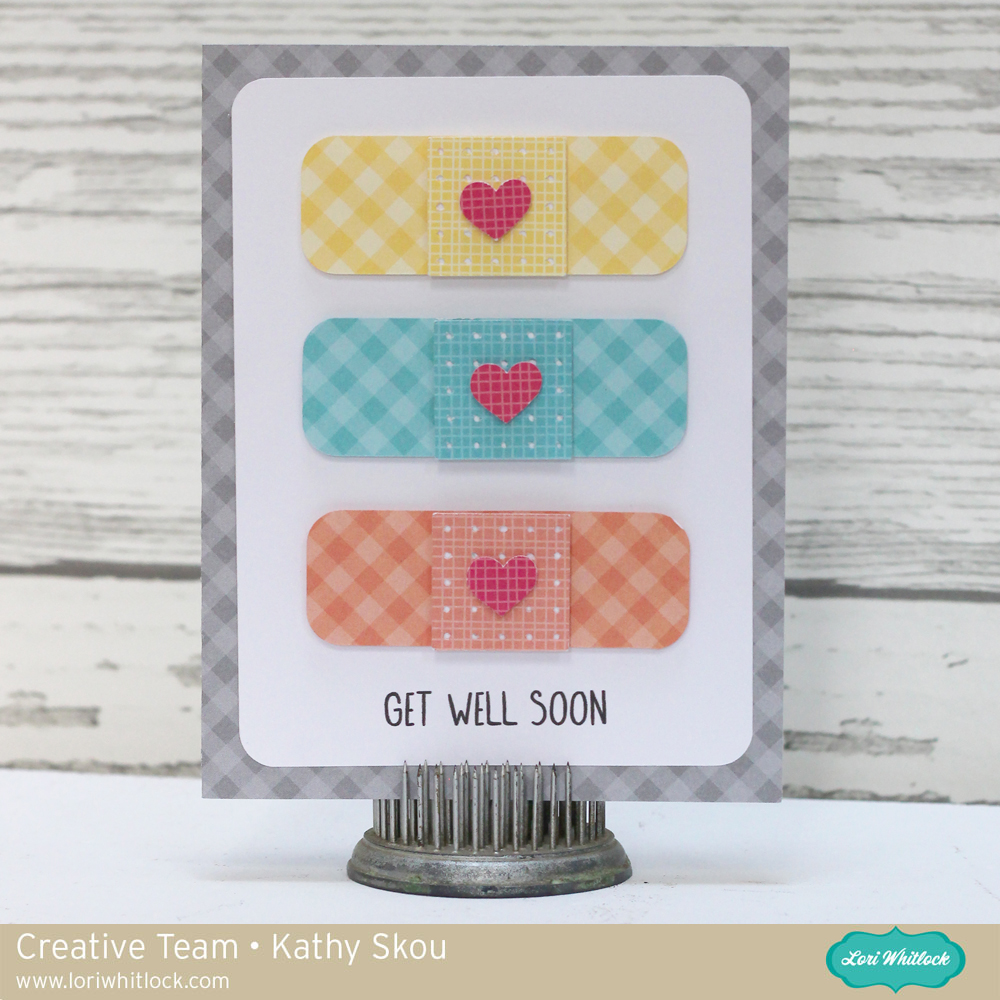
Hi Everyone! Today I have one of the new Get Well Cards from Lori Whitlock,  the Get Well Bandaid Card (available here in the Silhouette Store). I just love the simplicity of this card, it's so cute and colorful!   Take a peek...


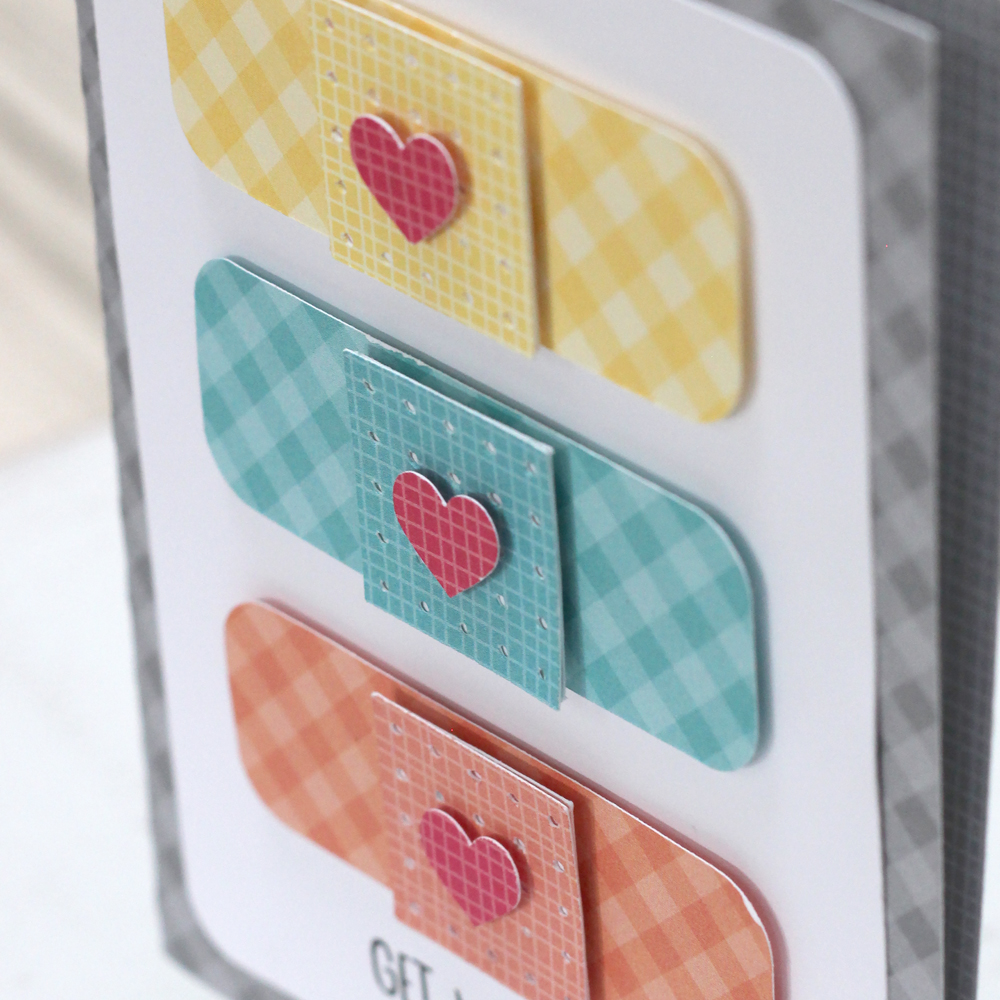
I used some fun Doodlebug Design Gingham Linen Petite Prints for this card.  To add a little dimension, I used some foam tape between the layers of the bandaids and also beneath the bandaids themselves. It's just such a cute design, who wouldn't feel better upon receiving this?


That's it for me today, thanks for stopping by to peek!

Wednesday, June 7, 2017

Doodlebug Design: Hats Off Cut files

Hi Everyone! Today I have a fun  little project I made for a good friend who after 9 years of hard work is getting her Master's Degree in Education!  I'm just so proud of her, she did it all while working, and with 2 kiddos!  Take a peek....


How cute is this little Owl Graduate Girl?  (here in the Lori Whitlock SVG Shop)  I re-colored the cut file in Silhouette to match her school colors, and print it on  inkjet printable vinyl which comes with laminate that makes it water safe (found here at Expressionsvinyl.com) using a tutorial I found here on the Silhouette School Blog.  The "wicked smaaht"... well it's a Boston thing... we don't like to say our "r's" here!  I can't wait to give it to her!  That's it for me today, thanks for stopping by to peek!


Friday, May 26, 2017

Lori Whitlock: Frog Shaped Card


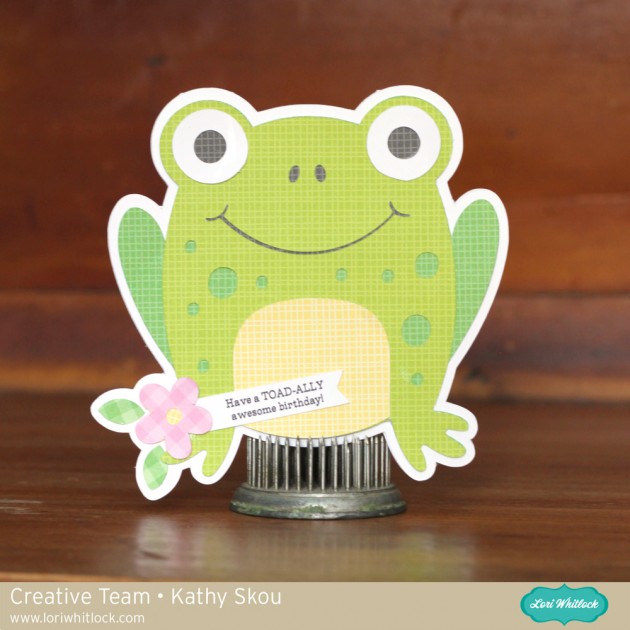
Hi Everyone! Today I have a sweet little birthday card that I created for Lori Whitlock,   We have a ton of May & June birthdays in our family, so I love how easily Lori's Shaped cards go together!  Take a peek...


I just adore the little frog, and the print and cut sentiment completes the card!  I used some Gingham Linen Petite Prints from Doodlebug Design for the papers.  Now to figure out which birthday I'll use this one for!  That's it for me today, thanks for stopping by to peek!

File Used:

Frog Shaped Birthday Card Lori's Shop

Frog Shaped Birthday Card Silhouette Store


Monday, May 1, 2017

Doodlebug Design Door Hangers

Hi Everyone!  Every once in a while my husband actually asks me to use my scrappy skills to make something for his work.  Recently he mentioned that some of the ladies he works with were wishing they had some way to close the "door" of their work cubes so they could get work done undisturbed.  He asked me if there was a sign I could make for them, and this is what I came up with....


I started with this door hanger from the Silhouette Store which I cut from some Doodlebug Design Bubble Blue Gingham Linen Petite Prints.  I made a print and cut insert for the door hanger which can be flipped to indicate whether the virtual door was open or closed.


To finish the hanger, I added this cute little typewriter from the Doodlebug Flea Market Cut files available here in the Silhouette Store and here in Lori Whitlock's SVG Shop.  The little heart is from the new Rainbow Heart Shaped Sprinkles from Doodlebug Design.


He said they were a big hit, now to see if they actually work!  That's it for me today, thanks for stopping by to peek!

Monday, April 17, 2017

Lori Whitlock Camera Shaped Box Card

Hi Everyone! Today I have a fun box card that I created for Lori Whitlock.  This is a perfect birthday card, it can be used for just about anyone! Take a peek...


The file I used is the A2 Shaped Box Card Camera (here in the Silhouette Store) I used some Echo Park Celebrate Spring and Celebrate Easter Collections by Lori Whitlock to piece this together.  Now off to make some more cards for all of those spring birthdays!  That's it for me today, thanks for stopping by to peek!


Friday, December 23, 2016

Lori Whitlock: Print and Cut Christmas Tags

Hi Everyone ! Well, we are down to the wire with the holidays, and I will admit, I'm a last minute wrapper! This year, I did think ahead a little and I created some fun tags using Lori's Print and Cut Christmas Tag Bundle. (Sold individually in the Silhouette Store here). I know a lot of Silhouette users are unsure how to use the print and cut feature, but it really is pretty easy, and the results are awesome!  I have a full tutorial here on the Lori Whitlock's Blog.  Here are the tags, so cute!

 
And here are some close-ups of the individual tags, I used some Lawn Fawn Perfectly Plaid Christmas for the tag bases.


That's it for me today, thanks for stopping by to peek!